
Visual Studio 2022, Raspberry Pi Pico W, System Programming, C++
Game Engine
Raspberry Pi Pico Game Engine
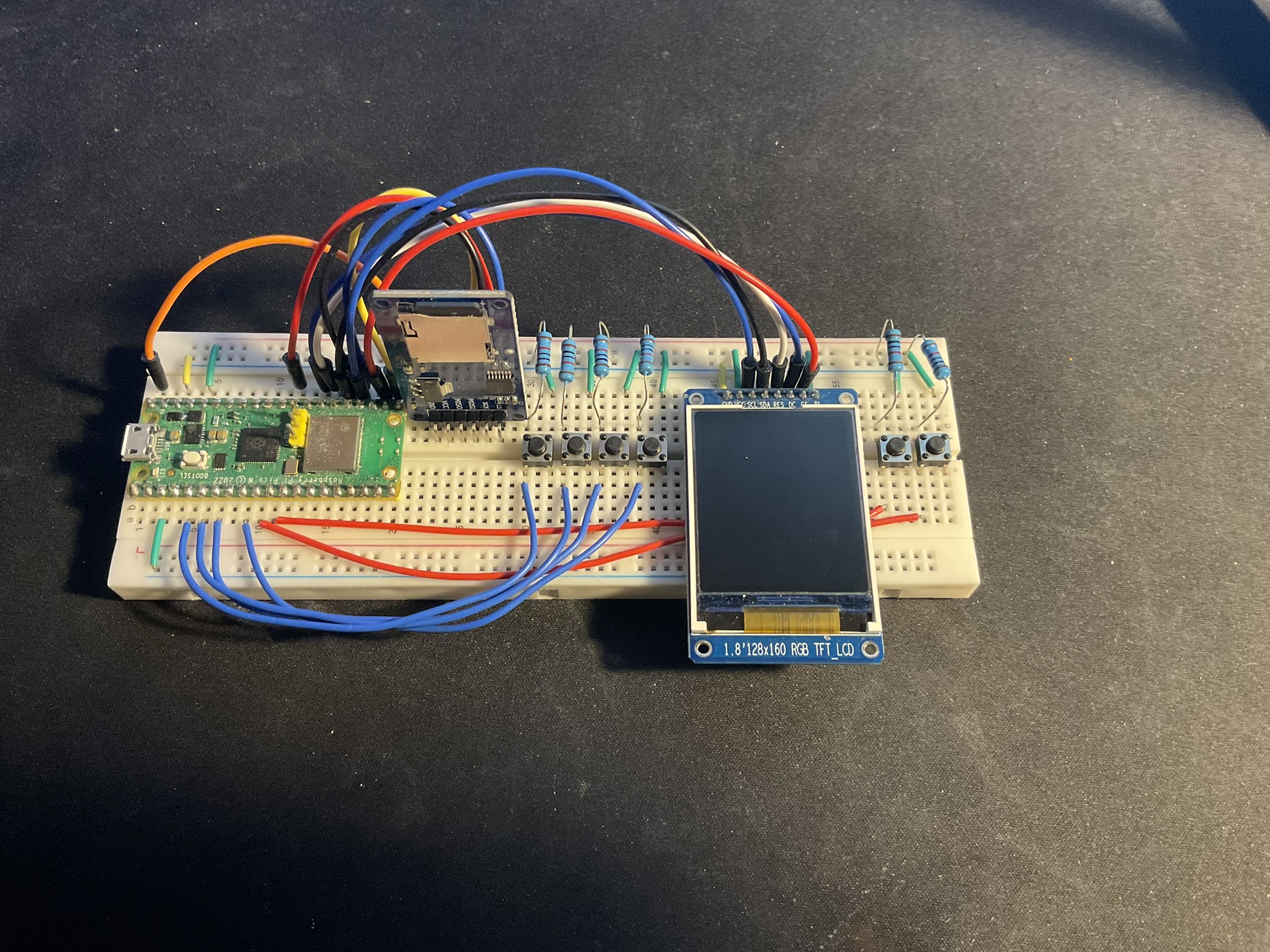
This is my solo passion project: a handheld game console built with a Raspberry Pi Pico microcontroller. Inspired by playing Pokémon on my old GameBoy Color, I wanted to build my own device that could run my own games. Using Visual Studio Code with C++ and the Raspberry Pi Add-On, I’m building both the games and the underlying engine.
With my latest update, switching from a vector-based ECS to a bitmask-based entity system, as well as splitting SPI communication between the display and SD card reader, it is now possible to run a full tilemap world at 34 FPS and simpler games at 60 FPS.
This project is still ongoing with the goal to create my own playable Pokémon game and creating a 3D printed housing for this device.
Take a look at the whole code on GitHub
Entity-Component-System
The engine is built around an Entity-Component-System (ECS) architecture for modularity and scalability. It already supports a physics engine, sprite and animations loading from an SD card, AI behaviour and much more.
Working within the strict hardware limits of the Raspberry Pi Pico — very limited RAM and flash memory — forced careful management of assets, memory, and CPU usage. I designed a compact architecture that handles physics, input, rendering, and file management while keeping resource usage minimal.
Each entity is represented by an index into the component arrays. Instead of storing component data directly, entities only contain metadata describing which components they currently own.
struct Entity
{
    uint32_t mask;
    EntityTag tag = EntityTag::Default;

    bool isAlive = true;
};
The components themselves only contain data. Keeping logic inside systems makes the architecture modular and easier to expand.
struct TransformComponent
{
    Vector2 currentPosition = {};
    Vector2 lastPosition = {};
    Vector2 currentSize = {};
};
struct PhysicsComponent
{
bool useGravity;
PhysicsType physicsType;
Vector2 currentVelocity;
bool facingLeft;
}; All component data is stored inside the world using fixed-size arrays. This ensures that the limited RAM of the Raspberry Pi Pico is used efficiently and prevents memory fragmentation caused by dynamic allocation.
struct World
{
    Entity entities[MAX_ENTITIES];
    uint8_t entityCount = 0;
    uint8_t activeCamera = INVALID_ENTITY;

    AssetManager assets;

    TransformComponent transforms[MAX_ENTITIES];
    PhysicsComponent physics[MAX_ENTITIES];
    MovementComponent movements[MAX_ENTITIES];

    InputIntendComponent inputIntends[MAX_ENTITIES];

    AIComponent ai[MAX_ENTITIES];

    ...
};
Systems then iterate over the entities, check the component mask, and only process entities containing the required components.
void InputMovementSystem::Update(World& world, float deltaTime)
{
    uint32_t requiredMask = PhysicsBit | MovementBit | InputIntentBit;

    for (uint8_t e = 0; e < MAX_ENTITIES; e++)
    {
        if (!world.entities[e].isAlive) continue;
        if ((world.entities[e].mask & requiredMask) != requiredMask) continue;

        auto& movement = world.movements[e];
        auto& physics = world.physics[e];
        auto& intend = world.inputIntends[e];

        ...
    }
}
Rendering
Rendering is performed by drawing into an RGB565 framebuffer in RAM. Once a frame is complete, the buffer is transferred to the display over SPI in a single operation.
class Renderer
{
private:
    ST7735& myDisplay;

    uint16_t myFramebuffer[ST7735::WIDTH * ST7735::HEIGHT];
    uint16_t transparentColor = 63519;

public:
    inline void SetPixel(int x, int y, uint16_t color);

    Renderer(ST7735& display);
    ~Renderer() = default;

    void Clear(uint16_t = 0x0000);
    void Display();

    void DrawRectangle(int x, int y, int w, int h, uint16_t color, bool filled = true);
    void DrawCircle(int x, int y, int radius, uint16_t color, bool filled = true);

    void DrawChar(int x, int y, char c, uint16_t color);
    void DrawText(int x, int y, const char* text, uint16_t color);

    void DrawSprite(int x, int y, Sprite& sprite, float zoom, bool flipX);
};
To use sprites, I store sprite definitions as files on the SD card. These are loaded into memory only when required. The world contains a sprite resource manager that tracks both available sprites and currently loaded resources.
struct SpriteDef
{
    const char* path;
    uint16_t width;
    uint16_t height;
    uint8_t indexOnSpritesheet;
};


struct SpriteDatabase
{
    SpriteDef sprites[MAX_SPRITES];
    bool filled[MAX_SPRITES] = {false};
};
Loaded sprites are stored separately in a cache to avoid repeatedly reading data from the SD card.
struct Sprite
{
    uint16_t width;
    uint16_t height;
    uint16_t pixels[MAX_SPRITE_PIXELS];
};

struct SpriteCache
{
    Sprite sprites[MAX_SPRITES];
    bool loaded[MAX_SPRITES] = {false};
};
Physics
All movement in this engine is handled through a dedicated physics pipeline. Input systems and AI systems modify the movement intent of entities, after which the physics system updates positions.
The collision system uses the AABB sweep method to account for fast-moving entities and tracks collision enter, stay, and exit events. Afterwards, the physics system resolves the collisions.
Systems are executed in a fixed order because the result of one system becomes the input for the next. For example, input modifies movement intent, physics resolves velocity, and rendering uses the final transformed state.
void Pong::Update(Input &input, float deltaTime)
{
    myInputSystem.Update(world, input);
    myActionSystem.Update(world, input);
    myUIButtonSystem.Update(world, input, myGameManager);

    if (runGame)
    {
        myAISystem.Update(world, deltaTime);
        myCameraSystem.Update(world, deltaTime);

        myInputMoveSystem.Update(world, deltaTime);
        myMovementSystem.Update(world, deltaTime);
        myJumpSystem.Update(world, deltaTime);
        myFollowSystem.Update(world, deltaTime);

        myPhysicsSystem.Update(world, deltaTime);
        myCollisionSystem.Update(world);
        myPhysicsSystem.ResolveCollisions(world, deltaTime);

        myAnimationSystem.Update(world, deltaTime);
        myTimerSystem.Update(world, deltaTime);
        myUITimerSystem.Update(world);
    }
}
This project taught me a lot about combining hardware and software in game development. Implementing an ECS, building a physics engine, and managing sprite sheets and file systems on an SD card helped me learn how to structure a large-scale, modular engine.
Seeing my own games run on a custom handheld device is incredibly rewarding. Balancing functionality with strict memory and performance constraints has been one of the most technically challenging and satisfying aspects of the project.
The current prototype showcases several small games, including:
- A Pong clone
- A Jump’n’Run demo
- A tilemap/animation demo where the player can walk around a small area
The next steps are to create full games for it. I still dream of making my own small version of Pokémon as well as other mini-games.